Last-minute cancellations
A client cancels at 4:45am for a 5:30 session. The slot is gone, you are up anyway, and there is nothing you can do about it.

Clients book a session with their coach at any hour, pay through Payfast if you want them to, and agree to your cancellation policy up front. You spend less time chasing and more time coaching.


A client cancels at 4:45am for a 5:30 session. The slot is gone, you are up anyway, and there is nothing you can do about it.
Sessions happen first, then the invoices and reminders start, and some clients quietly never pay.
One coach works early mornings, another evenings, and a third only Saturdays. Keeping their availability straight in a spreadsheet is a job in itself.
Each coach has their own column and their own working hours, so early starters and evening coaches both make sense. Drag a session to move it, and see what is booked, completed and paid at a glance.

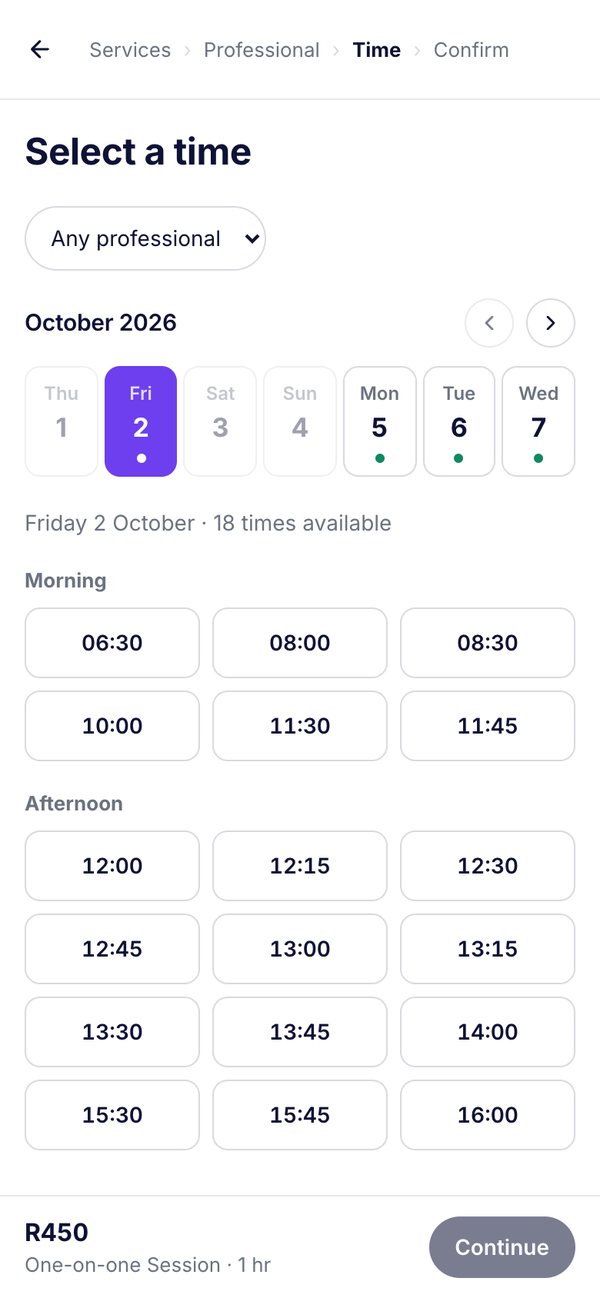
Clients open one link, choose a session and their coach, and pick from times that are genuinely free. Offer an intro assessment, one-on-one sessions and coaching check-ins, each with its own price and length.
Connect your own Payfast account and choose whether paying online is optional or required. Clients who pay agree to your cancellation policy first, and the money goes straight to your Payfast account.

Reports show sales over time after refunds, your top services, how each coach is performing, your busiest hours and how many clients are returning, so you can plan your week with real numbers.

The everyday situations that eat your time, and what happens when BookMyCalendar is looking after them.
You were up at 4:30 for nobody.
With BookMyCalendarMark the session as a no-show and choose to reschedule or cancel it. It is counted on their record, and the cancellation policy they agreed to applies to paid bookings cancelled late.
She taps your link at 11pm.
With BookMyCalendarShe picks an intro assessment and a coach, sees real free times, and gets a confirmation email, with no message exchange at all.
Your strength coach is on leave for a week.
With BookMyCalendarAdd the leave and he disappears from online booking for those days. Existing sessions that clash are listed so you can reschedule them.
You want to fill quiet afternoons.
With BookMyCalendarThe reports show your busiest and quietest hours and your top services, so you know where there’s room.

Every tool below is built in. Tap one to see exactly how it works.
One link for every client to book their session.
A calendar for every coach, with their own working hours.
Take payment through Payfast, optional or required.
Keep a fee when a session is cancelled late.
Count no-shows, then reschedule or cancel them with a tap.
Goals, injuries and preferences saved on every client.
Reminders go out before each session.
Sales, busiest hours, returning clients and no-show rate.
Professional & BusinessEach coach gets their own login and calendar.
Professional & BusinessSolo trainer: Starter. A studio with up to five coaches: Professional, which adds team logins, shifts and reports. Larger studios: Business.
Compare plansAnything else you want to know? Start the free trial and ask us from inside BookMyCalendar.
Not yet. BookMyCalendar books one client per appointment, which suits one-on-one sessions, assessments and coaching. Class capacity and class packs are not available.
Yes. Connect your own Payfast account and choose whether paying online is optional or required. Online payments switch on once you choose a plan.
Set a cancellation window and the share of the payment you keep. Clients who pay online agree to it before booking, and you can waive the fee with one tick.
Yes. Set weekly shifts for each coach, and add leave when they are away. Online booking only offers the times they are working.
No. The booking page works in any browser on a phone, tablet or computer.
Looking at another kind of business?
Start a 14-day free trial with no card needed and take your first booking today.
